
A variable data mailing starts with accurate, up-to-date information, so your pieces reach the people you mean them for. Segmenting the list — by demographics, purchase history, location — lets you personalize each version and get the most from the campaign.
But the way that seems easiest to prepare a segmented campaign can cost extra machine time and put the list’s accuracy at risk. Here’s why.
An example campaign
A school wants to send a letter to its community: prospective donors, current donors, and the suppliers, advertisers and business neighbours we’ll call corporate donors. Each group gets its own letter, so the mailing has to be segmented.
Splitting the recipients into three separate lists looks logical. But it turns one mailing into three projects, and opens the door to human error when each list is matched to its letter.
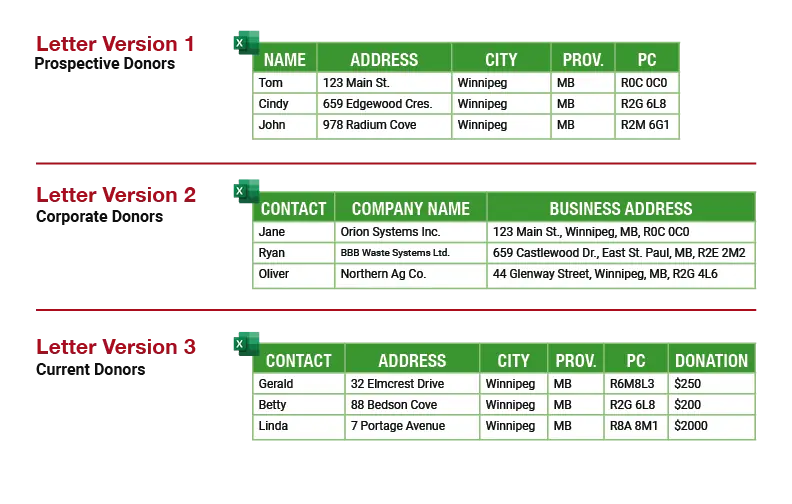
Notice the three lists don’t even agree with each other — different columns, different names for the same thing. Every inconsistency is a chance for a mistake when fields are mapped or the list is processed for Canada Post.
One campaign = one list
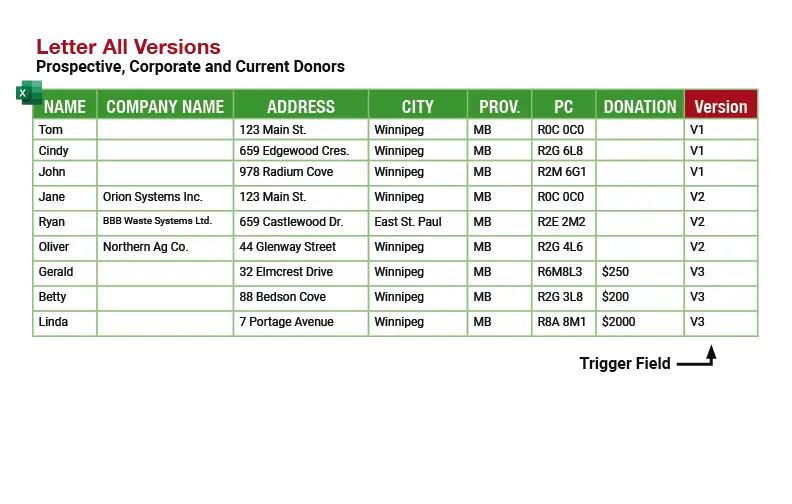
One list cuts the risk of error and makes the whole print run far more efficient.
Send every version with the list
Attach every letter your trigger field points to, even ones we’ve printed for you before. Name each file with its trigger value (for example, PNOV001.docx), and tell us which column holds the trigger. If a value in your list has no matching file, we’ll stop and ask before we print.
What your proof will show
For a segmented mailing, your proof includes one sample of each version, labelled with its trigger value and the number of people getting it. Check that every version is there and the counts look right before you approve.
No names on the letter? Still segmented.
If different people get different letters, even when the name only goes on the envelope, it’s a variable data mailing. Send it this way.
Ready when you are
 Order online
Postcards, newsletters and letters, priced up front. Upload your artwork and check out in the store.
Go to the store →
 Plan a mailing
Pick neighbourhoods in MailScout, our mailing map: see household counts and postage, and save the plan to order later.
Open MailScout →
 Get a quote
Booklets, forms, signs, a big mailing, something unusual — tell us about it and we’ll price it.
Request a quote →